Project: LICOM
SOFTWARE REQUIREMENTS SPECIFICATION
Date of preparation:
Jan 9, 2005
Prepared by:
Sowmya MS
Pradeep V
Contents
1 Introduction .
1.1 Purpose of Requirements Document
1.2 Conventions used in this document
1.3 Intended audience
1.4 Project Scope
1.5 Terminology
1.6 References
1.7 Document Overview
2 Overall Description.
2.1 Product Perspective
2.1.1 LICOM Basic Logistics
2.1.2 LICOM Working Logistics
2.1.3 Internal LICOM Logistics
2.2 LICOM functions
2.3 User classes
2.4 Operating environment
2.5 Design and Implementation constraints
2.6 User documentation
2.7 Assumptions
2.8 Overview of data requirements
2.9 General Constraints, Assumptions, Dependencies, Guidelines
2.10 User view of product use
3 External interface requirements
3.1 User interface
3.2 Hardware interfaces
3.3 Software interfaces
3.4 Communications interfaces
4 System features
4.1 System features
4.1.2 Stimulus/Response Sequences
4.1.3 Functional requirements
5 Non-functional requirements
5.1 Performance requirements
5.2 Safety requirements
5.3 Security requirements
5.4 Software quality attributes
5.5 Business Rules
5.6 Special User Requirements
6 Other requirements
1 INTRODUCTION:
1.1 Purpose:
The Software Requirements Specification (SRS) specifies the requirements of LICOM, a compression/de-compression agent that can be used on networked clients and their servers. The document will serve the end-users who intend to deploy LICOM on their machines, and the network administrators who propose to set up LICOM on their servers.
1.2 Conventions used in this document:
Main Title: Font: Times New Roman
Style: Bold; Size: 12
Sub Titles: Font: Times New Roman
Style: Bold; Size: 12
Other Text matter: Font: Times New Roman
Style: Size: 12
1.3 Intended audience:
Client-side users:
They get to understand how LICOM functions.
Server Administrators:
Server administrators are recommended to read through the whole document, so that they get a complete picture of how the software functions, both externally and internally, and so that they can address any security issues that may concern them.
1.4 Project Scope:
LICOM is a
compression/de-compression tool that sits in-between the browser and content
from the server. It aims to facilitate compression of ASCII text, RTF, DOC,
PDF, HTML and similar filetypes upto 550% and GIF, JPG, BMP and similar image
filetypes upto 70% of their original size.
1.5 Terminology:
- LICOM: Linux Compression / de-compression
- LICOMed: A file is said to be LICOMed if it has been compressed by the LICOM tool/agent (at the server-end)
- deLICOMed: A file is deLICOMEd when it is de-compressed by the LICOM tool/agent (at the client-end)
- Client: A computer connected to a network that receives data from a server
- Server: A computer on a network that services several other clients
- Request: A proposal for data from a client to a server
- Response: The process by which the server sends the requested data to the client.
- Client-side user: A person who uses the computer at the client-end
- Server Administrator: A person who installs and maintains software on the server and whose primary job is to ensure that the server is always up and is effectively functioning, without any undesired outside interference.
- User: Refers to both Client-side user and Server Administrator, unless specified otherwise
1.6 References:
General study of existing Image compression technologies:
http://www.iee.et.tu-dresden.de/~franz/image1.html
JPG Format FAQ:
http://www.faqs.org/faqs/jpeg-faq
HTTP Proxy Servers:
http://vms.process.com/~help/helpproxy.html
HTTP protocol specification:
http://www.ics.uci.edu/pub/ietf/http/rfc1945.html
HTTP protocol working:
http://www.garshol.priv.no/download/text/http-tut.html
Socket Programming in C:
http://www.ecst.csuchico.edu/~beej/guide/net/html/intro.html
1.7 Document Overview
Section 1 of this
SRS gives a depiction of what LICOM is all about. It can also aid in the actual
software development process.
Section 2 gives a
description of LICOM, basic, internal and working logistics, operating
environment, design and implementation constraints and data input requirement.
Section 3 describes
external interface requirements, such as user, hardware and software interface.
Section 4 depicts
the features provided by the software, and introduces the functional
requirements.
Section 5 addresses
the non-functional requirements such as security issues and software quality
issues
2 OVERALL DESCRIPTION:
2.1 Product Perspective:
2.1.1 LICOM Basic Logistics:
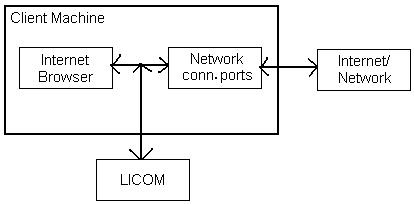
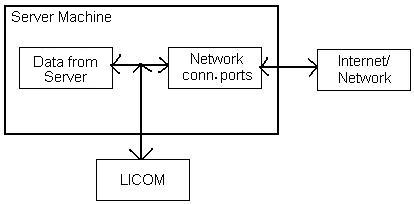
Two versions of LICOM exist. One is installed at the client side (the client issues HTTP requests) and another version is installed at the server side (the server responds to requests).

The LICOM version at the client-end is the actual de-compressor
The LICOM version at the server-end is the compressor
2.1.2 LICOM Working Logistics:
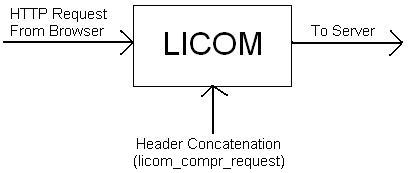
This HTTP request from the client is intercepted by LICOM, and LICOM adds a new HTTP header to the request. This header is named as licom_compr_request.
When the server reads the HTTP request, it will see the licom_compr_request header. If LICOM is installed at the server, the header is recognized and the file sent back to the client is compressed and sent. This is notified by LICOM by adding a header to the response stream.. licom_compressed
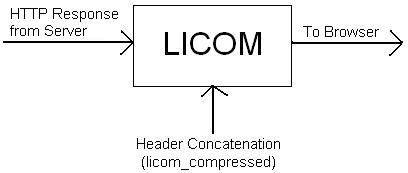
Finally, LICOM at the client end intercepts the Response from the server. If a licom_compressed header is found, it decompresses the file and sends the output to the browser (or memory). This is the general functioning of LICOM
2.1.3 Internal LICOM Logistics:
LICOM has to be installed on both the client and the server. This is the only way that this compression technology can work.
However, in accordance to this, there are 4 scenarios possible:
- Client machine has LICOM installed, server does not have it installed
- Server machine has LICOM installed, client does not have it installed
- Both Server and Client have LICOM installed
- Both Server and Client don’t have LICOM installed.
We have to deal with the first three scenarios. The fourth scenario obviously does not need to be addressed.
Scenario 1: (Client machine has LICOM installed, server does not have it installed)
At the client side HTTP request, LICOM will concatenate a HTTP header called licom_compr_request.
In this particular scenario, the server machine does not have LICOM installed. So it wont know what to do with this header (licom_compr_request). It just ignores the header. According to the HTTP specification, browsers/softwares are expected to ignore headers that they don’t recognise. [under ‘Entity Headers’ of the official HTTP specification]. When the response (reply from the server) is started, the server machine DOES NOT add a licom_compressed header.
When the file arrives at the client side, LICOM looks for the licom_compressed header. It won’t find the header in this scenario. So, it DOES NOT parse the file and simply sends it through to the browser (or memory).
Scenario 2: (Server
machine has LICOM installed, client does not have it installed)
At the client-side, there is no LICOM. So, a licom_compr_request header will never be added to the HTTP request.
When the server receives the request, LICOM will look for the header (licom_compr_request). It wont find it, so it wont compress the data that it sends.
When the file arrives at the client side, there is no LICOM installed. Also, there is no LICOM specific header in the response from the server. Everything goes on as always.
Scenario 3: (Both Server and Client have LICOM installed)
A perfect world.
At the client-side, the header has been added (licom_compr_request). The LICOM agent installed at the server sees this header, and immediately compresses the file that has been requested by the client and sends it to the client. It also adds a header (licom_compressed).
LICOM sitting at the client-end sees this header (licom_compressed). It parses the file (deLICOMs it), removes the header (licom_compressed) and then passes the file on to the browser (or memory).
These are the internal logistics of LICOM.
2.2 Product Functions:
The various functions provided by LICOM are:
1. Analysis of HTTP headers in order to determine whether the response should be compressed or not
2. Compression of proposed (or administrator specified) file formats
3. Allow for disabled mode of operation, upon direction from the client/administrator or automatically as applicable.
2.3 User Classes:
Client-side Users:
The client side users are the users at the client-end of the client/server architecture and can decide if they want their network connection to facilitate LICOM or not.
They can:
1. Choose the file types that they want to be LICOMed.
2. Specify a list of servers from where data should NOT be LICOMed.
Server Administrators:
The server administrators are the users at the server-end of the client/server architecture and they have the most options in deploying LICOM on their server.
They can:
1. Choose the file types that they want to be LICOMed.
2. Specify any type of data that they don’t want to be LICOMed.
3. Set up even more options for the functioning of LICOM such as security features etc.
2.4 Operating Environments
Operating Systems : Linux/ Windows 98 and later
Recommended Processor : Pentium-III (or above).
2.5 Design Implementation Constraints:
1.
LICOM does not absolutely require a powerful
client-side processor, but its speed of operation will severely depend on the
processor speed. A 2 GHz or greater processor is recommended.
2.6 User Documentation:
Proposed user documentation for LICOM includes online help facility, a do’s and don’ts recommendation and a bug-reporting facility. These will be bundled with the software at the release phase.
2.7 Assumptions
Installation of LICOM on both client and server end. Otherwise, LICOM will not be useful as specified in section 2.2 (LICOM working logistics).
2.8 Overview of Data
Requirements:
A comparison of this section with sections 2.1 and 2.2 and 2.3 of this SRS would be more enlightening.
LICOM client-side agent (immediately at the time of request):
Input: HTTP request headers
Output: Original HTTP headers + Appended HTTP header
LICOM Compressor - Server-side agent:
Input: HTTP headers and the data
Output: modified HTTP headers and the compressed data
LICOM de-compressor – Client-side agent:
Input: modified HTTP headers and the compressed data
Output: Original HTTP headers and de-compressed data
2.9 General Constraints, Assumptions, Dependencies, Guidelines:
Not Applicable
2.10 User view of Product Use:
A client-machine requests data from a server. The server responds with LICOMed data. The client-end LICOM agent deLICOMs the response data to get back the original data, which is sent to an appropriate unit (memory or browser).
3 EXTERNAL INTERFACE REQUIREMENTS:
3.1 User Interface:
Client-end GUI:
A GUI exists for the Client-end version of LICOM using which the user can set the various features of LICOM.
Server-end GUI:
A more advanced Server-end GUI exists for the Server-end version of LICOM, so that the Server Administrator can set-up advanced options provided by this version of LICOM.
3.2 Hardware Interface:
LICOM uses the hardware interface that actually connects the client to the server and vice-versa. It does not require any other interface.
3.3
Software Interface:
LICOM connects the browser (or memory or any other unit in the machine) to the port at which the network connection exists (ie. The port at which the browser, for instance, listens to) It thus logically sits in-between the browser and the network port.
3.4
Communications Interfaces:
TCP/IP Protocol, and as described in previous section
4 System Features:
4.1
Features:
All features listed are logically a single feature, and can be termed as ControlBox. However, they can be presented as follows
Auto-Detect: This feature enables the software to automatically decide whether the particular data can be compressed or not.
User-Specified Detect: This feature contains a list of file-types that are supported by LICOM. The user can modify this list (select/remove items) according to their requirement.
Disabled Mode: The user can disable LICOM in this mode.
Enabled Mode: From the disabled mode, LICOM can be re-instated to enabled mode by the user
Security Features: The user can set
basic security features.
Extended Security Features:
Applicable only to the server administrator in the Server-end version of LICOM.
Reporting: LICOM can be setup to report to a stream or log file and alert the user whenever required when certain issues that need attention arise.
4.1.2
Stimulus/Response Sequences:
Not Applicable
4.1.3
Functional requirements:
LICOM requires its installation at both client and server ends and requires the enabled mode to be set in both ends if the data has to be LICOMed.
5 Non-Functional Requirements:
5.1 Performance Requirements:
Though LICOM is programmed in order to increase the download speed by a proposed 550% for text content and 70% for image content, LICOM also aims not to generate too much of load on the processor. This said, sizeable processor load is inevitable.
- LICOM shall judge whether compression of a file before transmission will actually NOT result in reduced download time and decide whether or not to compress the file.
5.2 Safety Requirements:
Not Applicable
5.3
Security requirements:
Important security issues concern the server administrator at all times, and LICOM addresses them in order to create an environment of trust among its users.
LICOM will not disturb the functionality any other security installation on the client or server. Neither will it enhance security in a feasible manner. But it will provide basic security measures
1. The initial version of LICOM does not compress SSL encrypted files and allows them to pass by without any analysis of the data.
2. Basic security features are provided so that intrusion and similar abuses can be blocked.
5.4 Software quality attributes:
The source code of the product is going to be open as this is going to be open source software. It will be free for further modifications and improvements.
5.4.1 Portability:
-> LICOM interface is very simple and easy to configure, and can be fully automatic (if required so).
-> LICOM provides more options for the server administrators so that they can configure it to support only the content that they feel feasible.
-> A help system and bug report system will be made available.
5.4.2 Reliability:
Reliability is most important, as LICOM is also deployed at the most trouble-causing environment: the server.
-> If any problem arises, disable itself for that particular request and allow the response to carry on without interruption.
-> Report to the server administrator whenever an issue arises.
5.4.3 Testability:
LICOM will be tested under most development servers. LICOM will also be with actual websites.
5.5 Business Rules:
Not Applicable / already covered
5.6 Special User Requirements:
Not Applicable / already covered
5 Other Requirements:
Not Applicable / already covered